# Zara Scorecard

# Updating the Scorecard


# Processing the Scorecard


# Scorecard Data Collection

## <span style="text-decoration: underline;">SISU Data</span>

##### <span style="background-color: rgb(194, 224, 244); color: rgb(0, 0, 0);">Obtained via Control Tower</span>

<p class="callout info"><span style="font-size: 9.0pt; line-height: 107%; font-family: 'Aptos',sans-serif; mso-ascii-theme-font: minor-latin; mso-fareast-font-family: Aptos; mso-fareast-theme-font: minor-latin; mso-hansi-theme-font: minor-latin; mso-bidi-font-family: Arial; mso-bidi-theme-font: minor-bidi; mso-ansi-language: EN-US; mso-fareast-language: EN-US; mso-bidi-language: AR-SA;">https://sisu.inditex.com/control-tower/productivity</span></p>

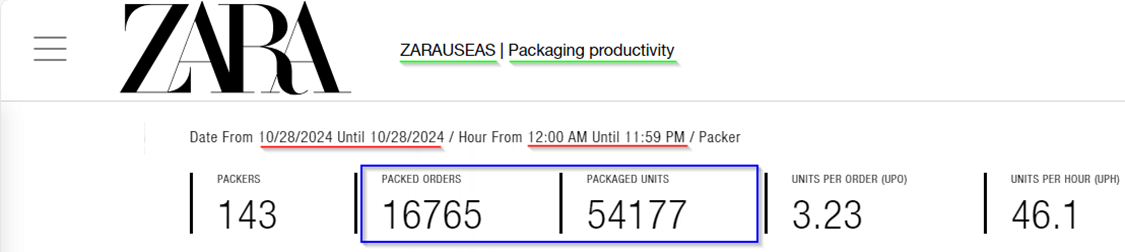
- <span style="text-decoration: underline;">Packed Orders</span>
- <span style="text-decoration: underline;">Packed Units</span>

[![image.png](https://docs.razar.io/uploads/images/gallery/2024-11/scaled-1680-/hlgoEFlv1Y6F1HtR-image.png)](https://docs.razar.io/uploads/images/gallery/2024-11/hlgoEFlv1Y6F1HtR-image.png)

<p class="callout warning">Change Time Zone to Pacific when gathering Rialto &amp; Vancouver Data (UTC-8:00 Pacific Time (US &amp; Canada)</p>

## <span style="text-decoration: underline;">PTL Sorted Data - SISU Sorting</span>

<span style="text-decoration: underline;">[https://sisu.inditex.com/](https://sisu.inditex.com/)</span>

Sign in as *<span data-teams="true">RQHYsTsaWz2Wi67uT5uwCA==</span>*

#### <span style="text-decoration: underline;">EPAC - SGA App (Vancouver)</span>

##### <span style="color: rgb(0, 0, 0); background-color: rgb(194, 224, 244);">EPAC -&gt; Reports -&gt; Sorted by user PTL</span>

- PTL Units

*(bottom left corner of window displays grand total of units)*

[![image.png](https://docs.razar.io/uploads/images/gallery/2024-11/scaled-1680-/f1Wh3pQIkjusi6xT-image.png)](https://docs.razar.io/uploads/images/gallery/2024-11/f1Wh3pQIkjusi6xT-image.png)

## <span style="text-decoration: underline;">MSR - SGA App</span>

#### AGV &amp; Manual : PO, BS, RT, PT 

##### <span style="background-color: rgb(194, 224, 244); color: rgb(0, 0, 0);">MSR -&gt; Reports -&gt; User Production</span>

- <span style="text-decoration: underline;">AGV Picked Units </span>

<span style="background-color: rgb(251, 238, 184); color: rgb(0, 0, 0);">AGV: AGV Distribution by Quadrant, AGV Distribution by Superquadrant</span>

- <span style="text-decoration: underline;">Manual Picked Units</span>

<span style="background-color: rgb(251, 238, 184); color: rgb(0, 0, 0);">Manual: Guided Quadrant Picking, Picking Ecommerce to Bulk Number, Picking without Paper</span>

##### <span style="background-color: rgb(194, 224, 244); color: rgb(0, 0, 0);">MSR -&gt; Reports -&gt; Movements</span>

Select all Movement Types under AGV and Manual, export to Excel, delimit and pivot to refine Metric Types.

<span style="text-decoration: underline;">***\*STATUS - COMPLETED\****</span>

<table border="1" id="bkmrk-agv-manual-metric-ty" style="border-collapse: collapse; width: 103.81%; height: 417.157px;"><colgroup><col style="width: 37.3063%;"></col><col style="width: 34.1099%;"></col><col style="width: 28.5838%;"></col></colgroup><tbody><tr style="height: 29.7969px;"><td class="align-center" style="height: 29.7969px;"><span style="text-decoration: underline;">**AGV**</span></td><td class="align-center" style="height: 29.7969px;"><span style="text-decoration: underline;">**Manual**</span></td><td class="align-center" style="height: 29.7969px;"><span style="text-decoration: underline;">**Metric Types**</span></td></tr><tr style="height: 29.7969px;"><td style="height: 29.7969px;">AGV Placing Bulk with Recommendation</td><td class="align-left" style="height: 29.7969px;">Box Placing</td><td style="height: 29.7969px;"><span style="background-color: rgb(251, 238, 184); color: rgb(0, 0, 0);">AGV PO Putaway</span></td></tr><tr style="height: 29.7969px;"><td style="height: 29.7969px;">Automation Direct Placing</td><td class="align-left" style="height: 29.7969px;">Direct Placing</td><td style="height: 29.7969px;"><span style="background-color: rgb(251, 238, 184); color: rgb(0, 0, 0);">AGV Backstock Putaway</span></td></tr><tr style="height: 29.7969px;"><td style="height: 29.7969px;">Automation Multireference Placing

</td><td style="height: 29.7969px;">Multireference Placing

</td><td style="height: 29.7969px;"><span style="background-color: rgb(251, 238, 184); color: rgb(0, 0, 0);">AGV Returns Putaway</span>

</td></tr><tr style="height: 29.7969px;"><td style="height: 29.7969px;">Automation Placing Sku Scanning</td><td style="height: 29.7969px;">Place Bulk Scanning with Recommendation</td><td style="height: 29.7969px;"><span style="background-color: rgb(251, 238, 184); color: rgb(0, 0, 0);">AGV Inbound PT Putaway</span></td></tr><tr style="height: 29.7969px;"><td style="height: 29.7969px;">Automation Placing Sku Scanning with Amount</td><td style="height: 29.7969px;">Place Bulk with Recommendation</td><td style="height: 29.7969px;"><span style="background-color: rgb(251, 238, 184); color: rgb(0, 0, 0);">Manual PO Putaway</span>

</td></tr><tr style="height: 29.7969px;"><td style="height: 29.7969px;">  
</td><td style="height: 29.7969px;">Placing Sku from Bag</td><td style="height: 29.7969px;"><span style="background-color: rgb(251, 238, 184); color: rgb(0, 0, 0);">Manual Backstock Putaway</span></td></tr><tr style="height: 29.7969px;"><td style="height: 29.7969px;">  
</td><td style="height: 29.7969px;">Placing Sky Scanning</td><td style="height: 29.7969px;"><span style="background-color: rgb(251, 238, 184); color: rgb(0, 0, 0);">Manual Returns Putaway</span></td></tr><tr style="height: 29.7969px;"><td style="height: 29.7969px;">  
</td><td style="height: 29.7969px;">Placing by Proximity</td><td style="height: 29.7969px;"><span style="background-color: rgb(251, 238, 184); color: rgb(0, 0, 0);">Manual Inbound PT Putaway</span></td></tr><tr style="height: 29.7969px;"><td style="height: 29.7969px;">  
</td><td style="height: 29.7969px;">Placing by Proximity Guided</td><td style="height: 29.7969px;">  
</td></tr><tr style="height: 29.7969px;"><td style="height: 29.7969px;">  
</td><td style="height: 29.7969px;">Placing Full Container</td><td style="height: 29.7969px;">  
</td></tr><tr style="height: 29.7969px;"><td style="height: 29.7969px;">  
</td><td style="height: 29.7969px;">Placing Scanning</td><td style="height: 29.7969px;">  
</td></tr><tr style="height: 29.7969px;"><td style="height: 29.7969px;">  
</td><td style="height: 29.7969px;">Placing Sku with Amount</td><td style="height: 29.7969px;">  
</td></tr><tr style="height: 29.7969px;"><td style="height: 29.7969px;">  
</td><td style="height: 29.7969px;">Placing with Amount</td><td style="height: 29.7969px;">  
</td></tr></tbody></table>

**<u>Work Order Types</u>**

<table border="0" cellpadding="0" cellspacing="0" class="MsoNormalTable" id="bkmrk-work-order-prefix-in" style="width: 687px; background: white; border-collapse: collapse; height: 197px;" width="707"><tbody><tr style="mso-yfti-irow: 0; mso-yfti-firstrow: yes; height: 22.35pt;"><td style="width: 110.76px; border: 1pt solid rgb(221, 221, 221); padding: 4.5pt 6pt; height: 22.35pt;" valign="top">**<span style="color: black; mso-color-alt: windowtext;">Work Order Prefix</span>**

</td><td style="width: 117.307px; border-top: 1pt solid rgb(221, 221, 221); border-right: 1pt solid rgb(221, 221, 221); border-bottom: 1pt solid rgb(221, 221, 221); border-image: initial; border-left: none; padding: 4.5pt 6pt; height: 22.35pt;" valign="top">**<span style="color: black; mso-color-alt: windowtext;">Inbound Work Type</span>**

</td><td style="width: 399.308px; border-top: 1pt solid rgb(221, 221, 221); border-right: 1pt solid rgb(221, 221, 221); border-bottom: 1pt solid rgb(221, 221, 221); border-image: initial; border-left: none; padding: 4.5pt 6pt; height: 22.35pt;" valign="top">**<span style="color: black; mso-color-alt: windowtext;">What it is?</span>**

</td></tr><tr style="mso-yfti-irow: 1; height: 22.35pt;"><td style="width: 110.76px; border-right: 1pt solid rgb(221, 221, 221); border-bottom: 1pt solid rgb(221, 221, 221); border-left: 1pt solid rgb(221, 221, 221); border-image: initial; border-top: none; padding: 4.5pt 6pt; height: 22.35pt;" valign="top"><span style="color: black; mso-color-alt: windowtext;">PO</span>

</td><td style="width: 117.307px; border-top: none; border-left: none; border-bottom: 1pt solid rgb(221, 221, 221); border-right: 1pt solid rgb(221, 221, 221); padding: 4.5pt 6pt; height: 22.35pt;" valign="top"><span style="color: black; mso-color-alt: windowtext;">PO</span>

</td><td style="width: 399.308px; border-top: none; border-left: none; border-bottom: 1pt solid rgb(221, 221, 221); border-right: 1pt solid rgb(221, 221, 221); padding: 4.5pt 6pt; height: 22.35pt;" valign="top"><span style="color: black; mso-color-alt: windowtext;">New Product from Zara</span>

</td></tr><tr style="mso-yfti-irow: 2; height: 22.35pt;"><td style="width: 110.76px; border-right: 1pt solid rgb(221, 221, 221); border-bottom: 1pt solid rgb(221, 221, 221); border-left: 1pt solid rgb(221, 221, 221); border-image: initial; border-top: none; padding: 4.5pt 6pt; height: 22.35pt;" valign="top"><span style="color: black; mso-color-alt: windowtext;">BS</span>

</td><td style="width: 117.307px; border-top: none; border-left: none; border-bottom: 1pt solid rgb(221, 221, 221); border-right: 1pt solid rgb(221, 221, 221); padding: 4.5pt 6pt; height: 22.35pt;" valign="top"><span style="color: black; mso-color-alt: windowtext;">Backstock</span>

</td><td style="width: 399.308px; border-top: none; border-left: none; border-bottom: 1pt solid rgb(221, 221, 221); border-right: 1pt solid rgb(221, 221, 221); padding: 4.5pt 6pt; height: 22.35pt;" valign="top"><span style="color: black; mso-color-alt: windowtext;">Old Stock from Stores</span>

</td></tr><tr style="mso-yfti-irow: 3; height: 47.55pt;"><td style="width: 110.76px; border-right: 1pt solid rgb(221, 221, 221); border-bottom: 1pt solid rgb(221, 221, 221); border-left: 1pt solid rgb(221, 221, 221); border-image: initial; border-top: none; padding: 4.5pt 6pt; height: 47.55pt;" valign="top"><span style="color: black; mso-color-alt: windowtext;">RT</span>

</td><td style="width: 117.307px; border-top: none; border-left: none; border-bottom: 1pt solid rgb(221, 221, 221); border-right: 1pt solid rgb(221, 221, 221); padding: 4.5pt 6pt; height: 47.55pt;" valign="top"><span style="color: black; mso-color-alt: windowtext;">Returns</span>

</td><td style="width: 399.308px; border-top: none; border-left: none; border-bottom: 1pt solid rgb(221, 221, 221); border-right: 1pt solid rgb(221, 221, 221); padding: 4.5pt 6pt; height: 47.55pt;" valign="top"><span style="color: black; mso-color-alt: windowtext;">Items returned to Zara and processed a Carbel (Easton &amp; Rialto, Vancouver processes their own returns)</span>

</td></tr><tr style="mso-yfti-irow: 4; mso-yfti-lastrow: yes; height: 22.35pt;"><td style="width: 110.76px; border-right: 1pt solid rgb(221, 221, 221); border-bottom: 1pt solid rgb(221, 221, 221); border-left: 1pt solid rgb(221, 221, 221); border-image: initial; border-top: none; padding: 4.5pt 6pt; height: 22.35pt;" valign="top"><span style="color: black; mso-color-alt: windowtext;">PT</span>

</td><td style="width: 117.307px; border-top: none; border-left: none; border-bottom: 1pt solid rgb(221, 221, 221); border-right: 1pt solid rgb(221, 221, 221); padding: 4.5pt 6pt; height: 22.35pt;" valign="top"><span style="color: black; mso-color-alt: windowtext;">Picking Transfer</span>

</td><td style="width: 399.308px; border-top: none; border-left: none; border-bottom: 1pt solid rgb(221, 221, 221); border-right: 1pt solid rgb(221, 221, 221); padding: 4.5pt 6pt; height: 22.35pt;" valign="top"><span style="color: black; mso-color-alt: windowtext;">Product transferred from other Zara warehouses</span>

</td></tr></tbody></table>

#### B2B AGV &amp; Manual Picked Units

Select all Movement Types under AGV and Manual, export to Excel, delimit column and pivot to refine Metric Types.

<table border="1" id="bkmrk-agv-manual-agv-distr" style="border-collapse: collapse; width: 46.0714%; height: 119.188px;"><colgroup><col style="width: 58.2925%;"></col><col style="width: 41.7115%;"></col></colgroup><tbody><tr style="height: 29.7969px;"><td class="align-center" style="height: 29.7969px;"><span style="text-decoration: underline;">**AGV**</span></td><td class="align-center" style="height: 29.7969px;"><span style="text-decoration: underline;">**Manual**</span></td></tr><tr style="height: 29.7969px;"><td style="height: 29.7969px;">AGV Distribution by Multilocation</td><td style="height: 29.7969px;">Guided Shop Picking</td></tr><tr style="height: 29.7969px;"><td style="height: 29.7969px;">AGV Distribution by Shop</td><td style="height: 29.7969px;">Guided Totals Picking</td></tr><tr style="height: 29.7969px;"><td style="height: 29.7969px;">AGV Distribution by Total</td><td style="height: 29.7969px;">  
</td></tr></tbody></table>

- <span style="text-decoration: underline;">B2B AGV Picked Units</span>
- <span style="text-decoration: underline;">B2B Manual Picked Units</span>

## <span style="text-decoration: underline;">EWMS - SGA App</span>

##### <span style="color: rgb(0, 0, 0); background-color: rgb(194, 224, 244);">EWMS -&gt; Reports -&gt; Billing Report</span>

- PT Outbound Units

[![image.png](https://docs.razar.io/uploads/images/gallery/2024-11/scaled-1680-/ulSTtjO3rdqxHhiG-image.png)](https://docs.razar.io/uploads/images/gallery/2024-11/ulSTtjO3rdqxHhiG-image.png)

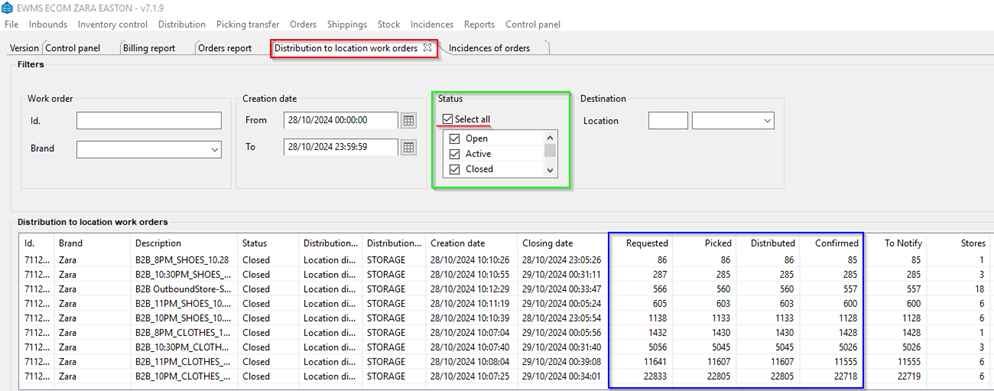
##### <span style="color: rgb(0, 0, 0); background-color: rgb(194, 224, 244);">EWMS -&gt; Distribution -&gt; Distribution to Location Work Orders</span>

- B2B *Requested* Units
- B2B *Distributed* Units
- B2B *Confirmed* Units
- B2B *Picked* Units

<span style="text-decoration: underline;">***\*STATUS - COMPLETED\****</span>

[![image.png](https://docs.razar.io/uploads/images/gallery/2024-11/scaled-1680-/udLWJGByn6fYN0Rp-image.png)](https://docs.razar.io/uploads/images/gallery/2024-11/udLWJGByn6fYN0Rp-image.png)

##### <span style="color: rgb(0, 0, 0); background-color: rgb(194, 224, 244);">EWMS -&gt; Orders -&gt; Orders Report</span>

- Sold Units 
    - All of the below may be preselected by default. The highlighted below are the only ones that need to be selected manually.

<table border="1" id="bkmrk-pending-picking-pres" style="border-collapse: collapse; width: 101.905%; height: 122.984px;"><colgroup><col style="width: 12.5149%;"></col><col style="width: 12.5149%;"></col><col style="width: 12.5149%;"></col><col style="width: 12.5149%;"></col><col style="width: 12.5149%;"></col><col style="width: 12.5149%;"></col><col style="width: 12.5149%;"></col><col style="width: 12.5149%;"></col></colgroup><tbody><tr style="height: 29.7969px;"><td style="height: 29.7969px;">Pending</td><td style="height: 29.7969px;">Picking</td><td style="height: 29.7969px;">Preselected</td><td style="height: 29.7969px;">Packing</td><td style="height: 29.7969px;">Picked</td><td style="height: 29.7969px;">Packed</td><td style="height: 29.7969px;">Shipping</td><td style="height: 29.7969px;"><span style="background-color: rgb(251, 238, 184); color: rgb(0, 0, 0);">Shipped</span></td></tr><tr style="height: 46.5938px;"><td style="height: 46.5938px;">Canc. Unpacking</td><td style="height: 46.5938px;">Stock Pending</td><td style="height: 46.5938px;">Stock Reported</td><td style="height: 46.5938px;">Stock Received</td><td style="height: 46.5938px;">PTL Sorting</td><td style="height: 46.5938px;">PTL Sorted </td><td style="height: 46.5938px;">Stock Partial Reported</td><td style="height: 46.5938px;">Stocked PTL Sorted</td></tr><tr style="height: 46.5938px;"><td style="height: 46.5938px;">Stock PTL Sorting</td><td style="height: 46.5938px;">Stock PTL Partial Sorted</td><td style="height: 46.5938px;">Stock Partial Received</td><td style="height: 46.5938px;">PTL Finished</td><td style="height: 46.5938px;"><span style="background-color: rgb(251, 238, 184); color: rgb(0, 0, 0);">Shipped Deferred</span></td><td style="height: 46.5938px;">Labelling</td><td style="height: 46.5938px;">  
</td><td style="height: 46.5938px;">  
</td></tr></tbody></table>

##### <span style="color: rgb(0, 0, 0); background-color: rgb(194, 224, 244);">EWMS -&gt; Reports -&gt; Billing Report</span>

- Shipped Units

[![image.png](https://docs.razar.io/uploads/images/gallery/2024-11/scaled-1680-/WQt5u1qafh9DHR4G-image.png)](https://docs.razar.io/uploads/images/gallery/2024-11/WQt5u1qafh9DHR4G-image.png)

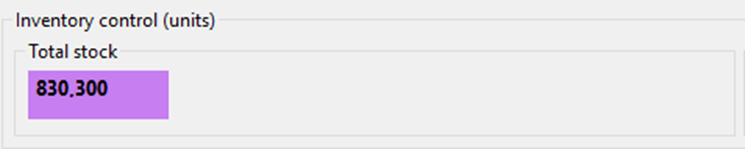
##### <span style="color: rgb(0, 0, 0); background-color: rgb(194, 224, 244);">EWMS -&gt; Control Panel -&gt; Control Panel</span>

- Total Stock Units

[![image.png](https://docs.razar.io/uploads/images/gallery/2024-11/scaled-1680-/KmK10p9mVmOdClFf-image.png)](https://docs.razar.io/uploads/images/gallery/2024-11/KmK10p9mVmOdClFf-image.png)

# Updating the SQDCP File


# Updating SQDCP

## Quality

##### Minesweeper (Smartsheet)

- <div ccp_infra_copy_id="" ccp_infra_timestamp="1732990901995" ccp_infra_user_hash="1463353188" ccp_infra_version="3" data-ccp-timestamp="1732990901995"><div>[https://app.smartsheet.com/sheets/38r8789JMrj65CmrCC8fCxMrxXJ4CCxJC894v681?view=grid](https://app.smartsheet.com/sheets/38r8789JMrj65CmrCC8fCxMrxXJ4CCxJC894v681?view=grid)</div></div>

##### Put-Away Errors

<span style="background-color: rgb(194, 224, 244); color: rgb(0, 0, 0);">MSR -&gt; Reports -&gt; Quality Incidences Visualization</span>

1. Set Operation to <span style="text-decoration: underline;">**Put-Away**</span>
2. Change Date Type to <span style="text-decoration: underline;">**Incidence Date**</span>
3. Input the Start (00:00:00) and End (23:59:59) Date/Time
4. Set Control Result to **Pending Feedback, Feedback Committed**
5. Search &amp; add both Control Results together for Total

##### Pick Errors

<span style="background-color: rgb(194, 224, 244); color: rgb(0, 0, 0);">MSR -&gt; Reports -&gt; Quality Incidences Visualization</span>

1. Set Operation to <span style="text-decoration: underline;">**Picking**</span>
2. Change Date Type to <span style="text-decoration: underline;">**Incidence Date**</span>
3. Input the Start (00:00:00) and End (23:59:59) Date/Time
4. Set Control Result to **Pending Feedback, Feedback Committed**
5. Search &amp; add both Control Results together for Total

##### Packing Errors

<span style="background-color: rgb(194, 224, 244); color: rgb(0, 0, 0);">SISU Control Tower -&gt; Quality Control</span>

- Set Date &amp; Time and Filter, record the KO

##### Packed Orders Audited

<span style="background-color: rgb(194, 224, 244); color: rgb(0, 0, 0);">SISU Control Tower -&gt; Quality Control</span>

- Set Date &amp; Time and Filter, record the Audited Orders

<p class="callout warning">*Requires Incognito Browser &amp;/ Inditex Login to access their PowerBi for the following 4 Metrics*  
</p>

##### Soft Scan Percentage (INDITEX PowerBi)

[https://app.powerbi.com/groups/me/reports/830d60b8-e6e6-465f-b3fb-2b28e9821c59/ReportSection?experience=power-bi](https://app.powerbi.com/groups/me/reports/830d60b8-e6e6-465f-b3fb-2b28e9821c59/ReportSection?experience=power-bi)

##### Percentage of Specialized Line Orders (INDITEX PowerBi)


[https://app.powerbi.com/groups/me/reports/2847c5f0-0edc-43ad-973b-87c77b46e303/1577dc60a7ba940899bd?experience=power-bi](https://app.powerbi.com/groups/me/reports/2847c5f0-0edc-43ad-973b-87c77b46e303/1577dc60a7ba940899bd?experience=power-bi)

##### Percentage of Specialized Packing Tables (INDITEX PowerBi)


[https://app.powerbi.com/groups/me/reports/2847c5f0-0edc-43ad-973b-87c77b46e303/1577dc60a7ba940899bd?experience=power-bi](https://app.powerbi.com/groups/me/reports/2847c5f0-0edc-43ad-973b-87c77b46e303/1577dc60a7ba940899bd?experience=power-bi)

##### PTL Sorting Errors (INDITEX PowerBi)


[https://app.powerbi.com/groups/me/reports/2d105817-42a3-40e0-accb-005a4f430b57/872aeafc0bec5f675aed?ctid=c8e8bdb6-8e7c-41d5-bc41-37fff3c33b75&amp;experience=power-bi&amp;clientSideAuth=0](https://app.powerbi.com/groups/me/reports/2d105817-42a3-40e0-accb-005a4f430b57/872aeafc0bec5f675aed?ctid=c8e8bdb6-8e7c-41d5-bc41-37fff3c33b75&experience=power-bi&clientSideAuth=0)

##### PTL Units

- Scorecard: ECOM Sheet - Row 103

##### Units Cancelled

<span style="color: rgb(0, 0, 0); background-color: rgb(194, 224, 244);">EWMS -&gt; Incidences -&gt; Incidences of Orders</span>

1. Purchase Date: Delete the Date in " <span style="text-decoration: underline;">**From** </span>&amp; <span style="text-decoration: underline;">**To**</span> "
2. Choose Incident Types : <span style="text-decoration: underline;">**Damaged &amp; Missing**</span>
3. Change the Date Type to <span style="text-decoration: underline;">**Finalization**</span> Date
4. Set the State to <span style="text-decoration: underline;">**Closed**</span>
5. Set Date &amp; Time for all day yesterday &amp; Search.  
    Total will be listed in bottom left.

##### Incidences Created

<span style="color: rgb(0, 0, 0); background-color: rgb(194, 224, 244);">EWMS -&gt; Incidences -&gt; Incidences of Orders</span>

1. Purchase Date: Delete the Date in " <span style="text-decoration: underline;">**From** </span>&amp; <span style="text-decoration: underline;">**To**</span> "
2. Choose Incident Types : <span style="text-decoration: underline;">**Damaged &amp; Missing**</span>
3. Change the Date Type to <span style="text-decoration: underline;">**Creation**</span> Date
4. Set the State to <span style="text-decoration: underline;">**ALL SELECTED STATES**</span>
5. Set Date &amp; Time for all day yesterday &amp; Search.  
    Total will be listed in bottom left.

## Delivery

##### ECOM Picked Units

ECOM Sheet : Row 18

##### B2B Picked Units (MSR)

B2B Sheet : Row 19

##### Planned Inbound Units

Inbound Sheet: Radial Planned Putaway

##### Units Putaway

ECOM Sheet : Row 18

##### ZARA Forecast Outbound Units

Outbound Sheet : Adjusted Forecast

##### Radial Planned Outbound Units

Outbound Sheet : Planned Units Processed

##### ECOM Packed Orders

ECOM Sheet : Row 112

##### ECOM Packed Units

ECOM Sheet : Row 108

##### PT Total Units

ECOM Sheet : Row 99

### Delivery - MSD Report

*All Data Recorded from MSD Bridge Email*

##### MSD - Wrong MSD

##### MSD - PT

##### MSD - Packed Late

##### MSD - Packed On Time

##### MSD - Late Courier

##### MSD - Misses Due To Courier

##### MSD - On Time Ship

##### MSD - True Delay

##### MSD - Radial MSD Orders

## Delivery

##### B2B - Requested Units

B2B Sheet : Row 9

##### B2B - Confirmed Units

B2B Sheet : Row 11

## Cost

##### Inbound UPH

ECOM : Row 33

##### Inbound Target

ECOM : Row 34

##### Pick UPH

ECOM : Row 88

##### Pick Target

ECOM : Row 89

##### PTL UPH

ECOM : Row 105

##### Pack UPH

ECOM : Row 110

##### Pack Target

ECOM : Row 111

##### Ship UPH

ECOM : Row 117

##### Facility UPH

ECOM : Row 154

##### Facility UPH W/O Training  


ECOM : Row 156

##### Indirect Hours

ECOM : Row 158

##### B2B UPH

B2B : Row 66

## Safety / People

#### <span style="text-decoration: underline;">Safety</span>

##### Near Miss &amp; First Aids (Smartsheet)

[https://app.smartsheet.com/b/publish?EQBCT=6c1ad88c0fb9407b981fae6507c73c22](https://app.smartsheet.com/b/publish?EQBCT=6c1ad88c0fb9407b981fae6507c73c22)

##### OSHA Recordables

Drag cell down to next Row, manually input if informed of OSHA Recordable from Safety &amp; Security Team

##### BBS Cards (Smartsheet)

[https://app.smartsheet.com/sheets/GCWPVCG2RJGJwhp6PHV2rcqqXg2pgrXXq84PRMj1?view=grid](https://app.smartsheet.com/sheets/GCWPVCG2RJGJwhp6PHV2rcqqXg2pgrXXq84PRMj1?view=grid)

##### Number of Safe Days

Drag cell down to next Row

##### Number of Days W/O Near Miss

Drag cell down to next Row

#### <span style="text-decoration: underline;">People</span>

Data can be found from Scheduled HC Excel File

##### Actual Attendance

SQDCP Sheet : Find respective date and report

##### Expected

SQDCP Sheet : Find respective date and report

# Zara Daily Metrics Report


# Daily Metrics Report

## Peak Metrics Spreadsheet  


Begin once Scorecard is **Completed**

#### Peak Metrics

*([https://shorturl.at/QF0cE)](https://shorturl.at/QF0cE))*

Open Document in Desktop Mode whilst Hardwire / VPN connected &amp; Refresh the Data to update the rows to populate with yesterday's data. Copy the two rows for B2B &amp; B2C (Column: Project) and paste them into the Zara Easton and Rialto Volume Spreadsheet.

<p class="callout danger">Select the correct location/ warehouse!</p>

[![image.png](https://docs.razar.io/uploads/images/gallery/2024-11/scaled-1680-/UQsN0G5DpEHXpwOp-image.png)](https://docs.razar.io/uploads/images/gallery/2024-11/UQsN0G5DpEHXpwOp-image.png)

#### Zara Easton and Rialto Volume

(*[https://shorturl.at/bAsmf)](https://shorturl.at/bAsmf))*

Open Document in Desktop Mode and paste data from Peak Metrics into this document.

#### Gathering the Order Report

##### <span style="background-color: rgb(194, 224, 244); color: rgb(0, 0, 0);">EWMS -&gt; Orders -&gt; Order Report</span>

Select the following Statuses:

<table border="1" id="bkmrk-pending-picking-pres" style="border-collapse: collapse; width: 100%;"><colgroup><col style="width: 20%;"></col><col style="width: 20%;"></col><col style="width: 20%;"></col><col style="width: 20%;"></col><col style="width: 20%;"></col></colgroup><tbody><tr><td>Pending</td><td>Picking</td><td>Preselected</td><td>Packing</td><td>Picked</td></tr><tr><td>Stock Pending</td><td>Stock Reported</td><td>Stock Received</td><td>PTL Sorting</td><td>PTL Sorted</td></tr><tr><td>Stock Partial Reported</td><td>Stock Packing</td><td>Stock PTL Sorted</td><td>Stock PTL Sorting</td><td>Stock PTL Partial Sorting</td></tr><tr><td>Stock Partial Received</td><td>PTL Finished</td><td>  
</td><td>  
</td><td>  
</td></tr></tbody></table>

*Most options pre-selected, need to de-select Packed, Shipping, Canc. unpacking, labelling*

- Change the From date to "One Month" ago today.
- Select "Purchase Date" then Search. Record the Units Volume &amp; **Export the file, name it something memorable (Open Orders\_EAS\_301124 (30th, Nov, 2024).**
- Export the file to your own device to run through the Metric Tool. 
    - Planned Units Processed found in Easton Production Plan.
- <u>"Total Open Orders" / "Total Open Units" / "Total Open Orders within 48hours" / "Total Open Units within 48hours"</u>
- - All data is compiled, exported &amp; filtered from the Open Orders report ^^^
    - Using the <span style="text-decoration: underline;">**"Daily Metrics Open Orders Tool"** </span> <span style="font-size: 11.0pt; line-height: 107%; font-family: 'Aptos',sans-serif; mso-ascii-theme-font: minor-latin; mso-fareast-font-family: Aptos; mso-fareast-theme-font: minor-latin; mso-hansi-theme-font: minor-latin; mso-bidi-font-family: Arial; mso-bidi-theme-font: minor-bidi; mso-ansi-language: EN-US; mso-fareast-language: EN-US; mso-bidi-language: AR-SA;">[https://shorturl.at/yEjeL](https://shorturl.at/yEjeL)</span>   
        Select Data and Refresh the Data.
- Once completed, find the last email sent in the thread and continue with a new link/ copy attached to the file with the most recent date.